
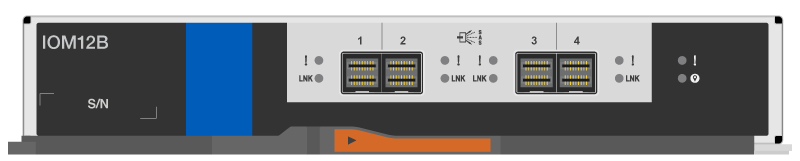
How do I identify the difference between IOM12, IOM12B, and IOM12C?
Applies to
- ONTAP 9
- DS224C, DS212C, DS460C SAS3 storage shelves
- IOM12, IOM12B, and IOM12C shelf modules
Answer
The IOM12(x) modules can be distinguished physically by their label and markings or from the command line.
Command line
storage shelf show -moduleor (nodeshell)environmentstatus shelfCLI commands:- IOM12 reports the following Mfg. 3x5 part number: 111-02850
- IOM12B reports one of the following Mfg. 3x5 part numbers: 111-04850 or 111-05055
- IOM12B reports the following Mfg. 3x5 part number: 111-05602
- (Nodeshell)
sysconfig -aCLI commands:- The shelf information reports the IOM model along with the firmware version
Shelf 10: DS224-12 Firmware rev. IOM12B A: 0120 IOM12B B: 0120
Appearance |
IOM12
|
IOM12B
|
IOM12C
|


Additional Information
- CLI: storage shelf show
- CLI: system controller config show
- Hot-swap or replace an IOM module - DS212C, DS224C, or DS460C
- NetApp Hardware Universe
- CPC-10651 -- End of availability & MPN transition: IOM12B for ONTAP DS212C, DS224C & DS460C
- CPC-00423 -- End of availability: DS212C, DS224C, and DS460C storage shelf and IOM12 part numbers