
Understanding Autonomous Ransomware Protection snapshot protection and attack detection
Applies to
- ONTAP version 9.10.1 or later
- Autonomous Ransomware Protection (ARP) or Anti_Ransomware (ARW)
Answer
What is ARP learning mode vs active mode?
-
When you first enable ARP on a volume, the volume will be in "Learning Mode."
- This mode is used to study workload behaviors as follows:
-
File Extensions Observed - all file extensions seen during both learning mode (dry-run) and active mode.
- Extensions seen during active mode are listed under "NEW FILE TYPES," a subset of "OBSERVED FILE TYPES" (in System Manager).
::> security anti-ransomware volume workload-behavior show -vserver vs0 -volume v1
                                          Vserver: vs0
                                           Volume: v1
                         File Extensions Observed: abc, xyz, pdf, doc
               Number of File Extensions Observed: 4
 Historical Statistics
               High Entropy Data Write Percentage: -
    High Entropy Data Write Peak Rate (KB/Minute): -
               File Create Peak Rate (per Minute): 1
               File Delete Peak Rate (per Minute): -
               File Rename Peak Rate (per Minute): -
 Surge Observed
                                   Surge Timeline: -
               High Entropy Data Write Percentage: -
    High Entropy Data Write Peak Rate (KB/Minute): -
               File Create Peak Rate (per Minute): -
               File Delete Peak Rate (per Minute): -
               File Rename Peak Rate (per Minute): -
                   Newly Observed File Extensions: pro, tek
         Number of Newly Observed File Extensions: 2
- Entropy - an evaluation of the randomness of data in a file, used by ONTAP to determine suspicious file manipulation.
- File IOPs - a record of how many files were created, renamed, and deleted (9.11.1).
Note: Surge detection might fail for file IOPs if the duration of the learning mode is less than 30 days.
- Learning mode is recommended to remain in place for a minimum of 7 to 30 days to avoid false positive results.
- False positives are when ONTAP flags an extension as suspicious that is not found to be malicious.
- After the given learning mode, administrators can move the volume into "Active mode."
- While in Active mode, ONTAP creates ARP snapshots to protect the data.
- Related KBs:
When does ARP create a snapshot? (How ARP creates Snapshots)
There are two conditions under which an ARP snapshot is created:
-
ARP proactively creates a volume snapshot when high entropy data is observed (for example:
Anti_ransomware_backup.2022-12-20_1248with a taganti-ransomware-backup).- This snapshot creation is silent to the end user until Attack Probability increments to moderate.
- Reference KB: ARP snapshots are generated without attack or surge detection.

-
A surge is observed.
- Surge detection does not change the attack probability.
- Only a snapshot is created upon observing the surge, retained for 5 days (configurable).
- It is not reported as an attack, so no alert is generated.
security anti-ransomware volume attack clear-suspectdoes not remove surge snapshots.
What do the attack probability values mean?
Attack probability is controlled by never-seen-before file extension count and is set as follows:
none - is not considered an attack.
low - set when the first never-seen-before file extension is observed.
lowis set when there are not a sufficient number of file extensions, or file extensions + high entropy, as given by attack-detection-parameters (configurable in 9.11).- If the attack probability stays
lowfor 5 days, ONTAP automatically runsclear-suspectto reset the probability to "None" and clear older suspect entries. - Files detected within the last 5 days may still be marked as suspects, which results in one ARP snapshot being retained while all other ARP snapshots are deleted.
- The 5-day window is fixed and cannot be changed.
moderate - set when more than 20 (configurable in 9.11, default value changed to 5 from 9.16.1) files with the same never-seen-before file extension are observed.
- Upon this, an EMS notification is generated and end-user intervention is required.
- See the GUI examples below for more details.
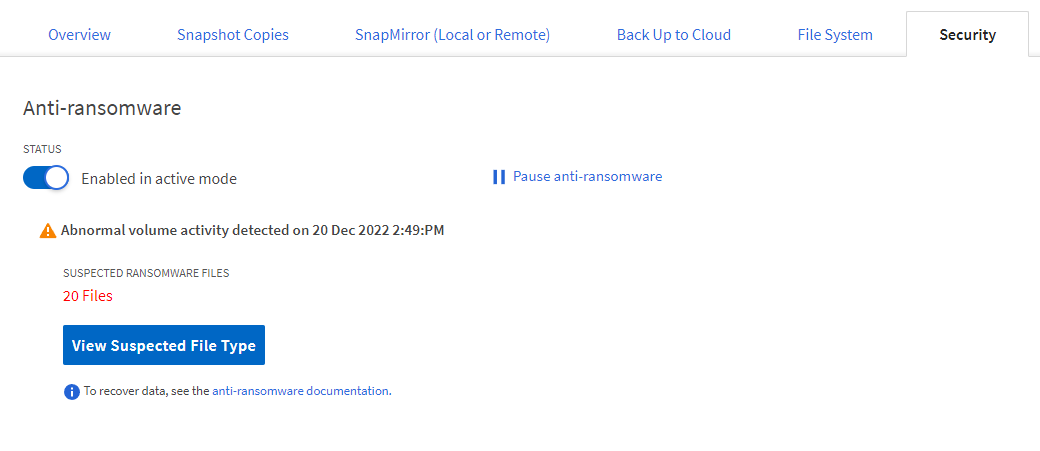
- ONTAP System Manager displays a "View Suspected File Type" button when the probability is set as moderate.
high attack probability is not used.
How are ARP snapshots retained and deleted?
- Modify options for automatic Snapshot copies
- Beginning with ONTAP 9.11.1, you can use the CLI to control the number and retention period for ARP snapshot copies automatically generated in response to suspected ransomware attacks.
ontap910::> options arw*

ontap910-01
     arw.snap.create.interval.hours    4
     arw.snap.create.interval.hours.post.max.count 8
     arw.snap.max.count                6
     arw.snap.max.retain.interval.days 5
     arw.snap.normal.retain.interval.hours 48
5 entries were displayed.
lccls9111001::> options arw*

lccls9111001-01
     arw.snap.create.interval.hours    4                 <--------------- independent of attack probability
     arw.snap.create.interval.hours.post.max.count    8  <--------------- independent of attack probability
     arw.snap.max.count    6                             <--------------- independent of attack probability
     arw.snap.max.retain.interval.days    5              <--------------- dependent of attack probability
     arw.snap.normal.retain.interval.hours    48         <--------------- dependent of attack probability
     arw.surge.snap.interval.days    5                   <--------------- independent of attack probability
 6 entries were displayed.
ontap913::> options arw*

ontap913-01
     arw.snap.create.interval.hours    4
     arw.snap.create.interval.hours.post.max.count
                                       8
     arw.snap.max.count                6
     arw.snap.max.retain.interval.days
                                       5
     arw.snap.new.extns.interval.hours
                                       48
     arw.snap.normal.retain.interval.hours
                                       48
     arw.snap.surge.interval.days      5
Attack Probability will affect whether these options take effect and how they take effect:
-
noneis not considered an attack.- All options are honored as configured.
- If only one snapshot is 2 days old, it is not deleted until another snapshot becomes 2 days old, when
arw.snap.normal.retain.interval.hoursis set to 48. - The snapshot gets deleted when it becomes 5 days old, while
arw.snap.max.retain.interval.daysis set to 5.
-
lowcan change tononeormoderatedepending on subsequent events (20+ files of the same extension seen or not).- The customer needs to act only when the probability changes to
moderate, confirming the attack. - While in
lowprobability, snapshots are retained since we don't know whether they'll change tononeormoderateeventually.
- The customer needs to act only when the probability changes to
-
moderateis considered an attack.arw.snap.max.countandarw.snap.create.xxxoptions are still considered and counts are honored.-
The maximum retain time (
arw.snap.max.retain.interval.days) for snapshots is not fully honored in this case.-
The snapshot created just before the attack is retained until the admin marks the attack as a false positive.
- If more than one ARP snapshot was created during the attack, all of them are deleted at once when the attack is cleared.
-
Snapshots created before or after the suspicious activity (no longer
moderate) are deleted after the maximum retain time.
-
- Please be aware of BUG 1525719 - ARP Snapshot copies are not cleaned up when attack probability is set to "none".
How do I check and clear ARP probability from the CLI or GUI?
When a never-seen-before file extension is observed (not observed during learning mode), the attack probability is set to low.
-
CLI and GUI output are below.
-
In System Manager, an "Abnormal volume activity detected on 20 Dec 2022 2:49 PM" message is shown with the option "View Suspected File Type."
- Note: No EMS/ASUP notification is generated at this point.
- If the newly found extension is not suspicious, the admin can mark it as a false positive (CLI or System Manager).
- If the newly found extension is suspicious, the admin can take appropriate action (like volume unmount) immediately, without waiting for confirmation or notification of an attack.
|
WARNING Volume unmount should be done with caution as it may result in an application outage in case of a false-positive report of an attack. |
CLI example, low:
::> security anti-ransomware volume show -vserver svm1 -volume Vol1

      Vserver Name: svm1
        Volume Name: Vol1
              State: enabled
 Dry Run Start Time: -

        Attack Probability: low
    Attack Timeline: 12/21/2022 09:34:45
 Number of Attacks: 1
- When 20 or more files are found with this unknown file extension, it is assumed as an attack.
- The probability changes from
lowtomoderateand acallhome.arw.activity.seenEMS/ASUP alert is generated:
- The probability changes from
cluster2::> event log show -message-name *arw*
 Time                Node             Severity      Event
 ------------------- ---------------- ------------- ---------------------------
 12/20/2022 11:27:55 cluster2-01      ALERT         callhome.arw.activity.seen: Call-home message for Vol1 (UUID: c437827d-8062-11ed-9f93-005056a0d3a0) svm1 (UUID: 4574c5fe-8916-11ec-b931-005056a0d3a0)
Note: In the above example, the SVM and volumes are called out.
CLI example, moderate:
::> security anti-ransomware volume show -vserver svm1 -volume Vol1

      Vserver Name: svm1
        Volume Name: Vol1
              State: enabled
 Dry Run Start Time: -

        Attack Probability: moderate
    Attack Timeline: 12/21/2022 09:34:45
 Number of Attacks: 1
GUI examples:
- Logging into System Manager and clicking the "Events" section will alert you that one more volume has observed abnormal behavior.

- Following that link will bring you to a list of impacted volumes.
- Clicking one of the impacted volumes will bring you to the screenshot below.

- Clicking one of the impacted volumes will bring you to the screenshot below.
If the reported attack is found to be a false positive, mark it as false positive (CLI or System Manager):
::> security anti-ransomware volume attack clear-suspect -volume Vol1 -false-positive true

Warning: All suspect details will be cleared.
 Do you want to continue? {y|n}: y
Note: Once marked as false-positive, the newly found file extension will be considered a valid extension, and future attacks will not be reported on this file extension.
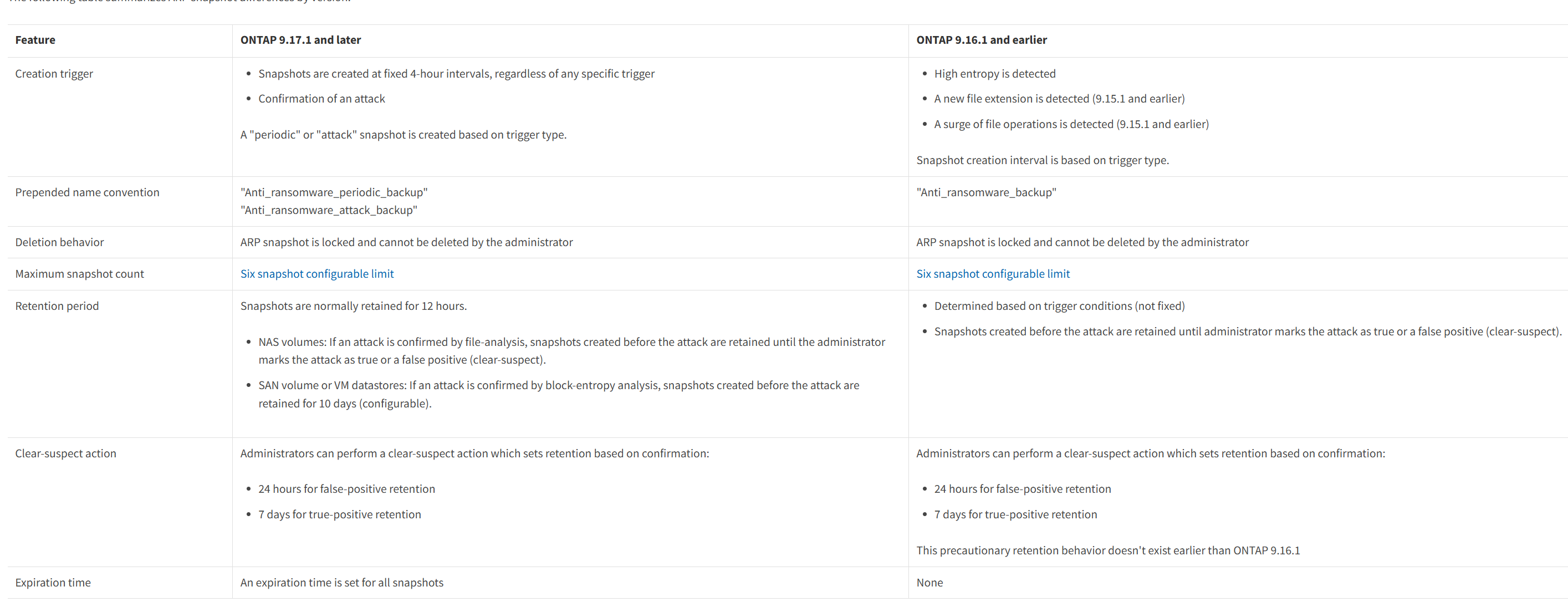
How does ARP attack detection differ by ONTAP version?
-
ONTAP 9.10.1 - an attack is assumed if 20+ files with never-seen-before extensions are observed AND those files are found to have high-entropy data.
- Both conditions must be true (Attack Probability moderate).
-
ONTAP 9.11.1+ - some ransomware keeps data entropy low by encrypting only parts of a file, not the whole file.
- To catch these, starting in 9.11.1 an attack is assumed if 20+ files (default) with never-seen-before extensions are found within 24 hours (default duration) — entropy data is not reviewed by default.
-
Once an attack is confirmed and reported, further attacks are not reported until the previous attack state is cleared.
- New attacks are only reported after the already reported attack is cleared.
-
An ASUP alert is sent once every 24 hours until the attack is cleared.
-
For some workloads, this may result in a false positive.
-
For such workloads, this file-extension-only based detection can be turned off as shown below:
::> security anti-ransomware volume attack-detection-parameters modify -vserver svm1 -volume Vol1 -based-on-never-seen-before-file-extension false- An attack is assumed only if both never-seen-before extension AND high-entropy data are observed.
-
-
The default file count (20) and duration (24 hours) can be modified via attack-detection parameters.
- This can be done by System Manager as well.
-
Starting in 9.11.1, file create/delete/rename operations are tracked at the volume level on an interval basis during Learning mode, and a baseline value for these operations is built.
- Similarly, the amount of incoming high-entropy data is tracked at the volume level on an interval basis and a baseline value is built.
-
After switching to Active mode, if a significant surge is observed in any tracked activity at a given interval, it's considered unusual and a snapshot is proactively created (example:
Anti_ransomware_backup.2022-12-21_1135with taganti-ransomware-backup-for-surge).- However, this is not reported as an attack as there are higher chances of false positives.
-
The snapshot is retained for 5 days, on the assumption that if it turns out to be a real attack, data can be recovered from the silently created snapshot.
-
The baseline value (Historical Statistics) and the surge observed can be seen below.
- They can be seen in System Manager as well.
- After switching from Learning to Active mode, the baseline still updates periodically (actual workload average value per 20 minutes) according to the workload's change.
-
Historical Statistics
- Baseline values created during ARP learning mode.
- Collected over the learning period to represent normal workload behavior.
-
Surge Observed
- Real-time observations compared directly against the learned baseline.
- Records abnormal or sharply increased activity relative to Historical Statistics.
-
The amount of surge to be considered as unusual activity can be modified from its default value to any value suitable for a given workload.
- Workload activity surge detection can be turned off as well.
- Ransomware detection based on file extension and data entropy will continue with no dependency on surge detection.
- Workload activity surge detection can be turned off as well.
::> security anti-ransomware volume attack-detection-parameters show -vserver svm1 -volume Vol1
                                              Vserver Name : svm1
                                               Volume Name : Vol1
             Is Detection Based on High Entropy Data Rate? : true
   Is Detection Based on Never Seen before File Extension? : true
                   Is Detection Based on File Create Rate? : true
                   Is Detection Based on File Rename Rate? : true
                   Is Detection Based on File Delete Rate? : true
            Is Detection Relaxing Popular File Extensions? : true
                 High Entropy Data Surge Notify Percentage : 100
                  File Create Rate Surge Notify Percentage : 100
                  File Rename Rate Surge Notify Percentage : 100
                  File Delete Rate Surge Notify Percentage : 100
 Never Seen before File Extensions Count Notify Threshold : 20
        Never Seen before File Extensions Duration in Hour : 24
Note: By default, a 100% increase is considered a surge. For example:
- If the high-entropy data percentage was 8% during learning mode (Historical Statistics), then when it becomes 16%+ (Surge Observed), it's considered a surge.
- If the high-entropy data percentage was 60% during learning mode, it's recommended to change the surge percentage from the default 100% to 50%, so the increase which is 60% + 30% = 90% (i.e., when high-entropy percentage increases from 60% to 90%) is considered a surge.
- If the high-entropy percentage is 98% for a given workload, a surge cannot be detected because there is room for just a 2% increase, which is not a distinguishable difference.
::> security anti-ransomware volume workload-behavior show -vserver svm1 -volume Vol1
                        Vserver                  : svm1
                        Volume                   : Vol1
                        File Extensions Observed : jpg, txt, html, mp4, pdf,
                                                   png, doc, gif
              Number of File Extensions Observed : 8

Historical Statistics
   High Entropy Data Write Percentage            : 70
   High Entropy Data Write Peak Rate (KB/Minute) : 5452
   File Create Peak Rate (per Minute)            : 24
   File Delete Peak Rate (per Minute)            : 80
   File Rename Peak Rate (per Minute)            : -

Surge Observed
   Surge Timeline                                : 12/21/2022 12:51:14
   High Entropy Data Write Percentage            : -
   High Entropy Data Write Peak Rate (KB/Minute) : -
   File Create Peak Rate (per Minute)            : 53
   File Delete Peak Rate (per Minute)            : -
   File Rename Peak Rate (per Minute)            : -
   Newly Observed File Extensions                : -
   Number of Newly Observed File Extensions      : -
If the reported surge is a one-time application behavior and the volume should continue to report the same surge in the future without any change in baseline value, it can be done via the clear-surge option:
::> security anti-ransomware volume workload-behavior clear-surge -vserver svm1 -volume Vol1
Note: It can not clear ARP snapshots that surge detection triggered.
If the reported surge is normal application behavior and that reported surge value should be considered as a new baseline for future reference, it can be done via the update-baseline-from-surge option:
::> security anti-ransomware volume workload-behavior update-baseline-from-surge -vserver svm1 -volume Vol1
Note: It can not clear ARP snapshots that surge detection triggered.