NetApp Knowledge Base

Mediator shows as failed in OCCM

Views:
1,560
Visibility:
Public
Votes:
0
Category:
cloud-volumes-ontap-cvo
Specialty:
amazon_web_service
Last Updated:

Applies to

  • OnCommand Cloud Manager (OCCM)
  • Cloud Volume ONTAP Mediator 3.7.0

Issue

Mediator shows as failed in OCCM.
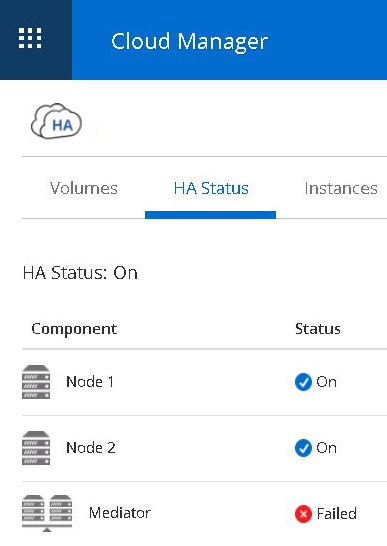
Mediator shows as failed in OCCM

Cause

Corrupted mediator version package.

Solution

Contact NetApp Technical Support and reference this article for further assistance.

Additional Information

Check the status mediator and scst services 

sudo systemctl status mediator

sudo systemctl status scst


Internal Notes

Action Plan:

Connect to the Mediator via SSH and run the command:
curl http://127.0.0.1:3080/update/status

If the package version is missing/corrupted a similar output is expected:
<!DOCTYPE html>
<html>
  <head><title>Server error</title></head>
  <style>
      body { background-color: #caecf6 }
      #raptor {background: url(/mojo/failraptor.png); height: 488px; left: 50%; margin-left: -371px; margin-top: -244px; position:absolute;top: 50%; width: 743px;}
    </style>
  <body><div id="raptor"></div></body>
</html>

In this case, the package version should be replaced.

Notes:

  • Consult Core/Cloud Escalation Engineer before performing the activity.
  • Package is located under/var/lib/mediator/package_versions folder and can be copied from a working mediator that is in the same version.
  • Package can be inserted to Mediator using FTP and copied to/var/lib/mediator/package_versions folder using cp command.
  • See also: Mediator upgrade was stuck in "update_in_progress" state as further changes might be needed.


Sign in to view the entire content of this KB article.

New to NetApp?

Learn more about our award-winning Support

NetApp provides no representations or warranties regarding the accuracy or reliability or serviceability of any information or recommendations provided in this publication or with respect to any results that may be obtained by the use of the information or observance of any recommendations provided herein. The information in this document is distributed AS IS and the use of this information or the implementation of any recommendations or techniques herein is a customer's responsibility and depends on the customer's ability to evaluate and integrate them into the customer's operational environment. This document and the information contained herein may be used solely in connection with the NetApp products discussed in this document.